问题标题
VChart 中图例翻页器箭头的样式如何配置?
问题描述
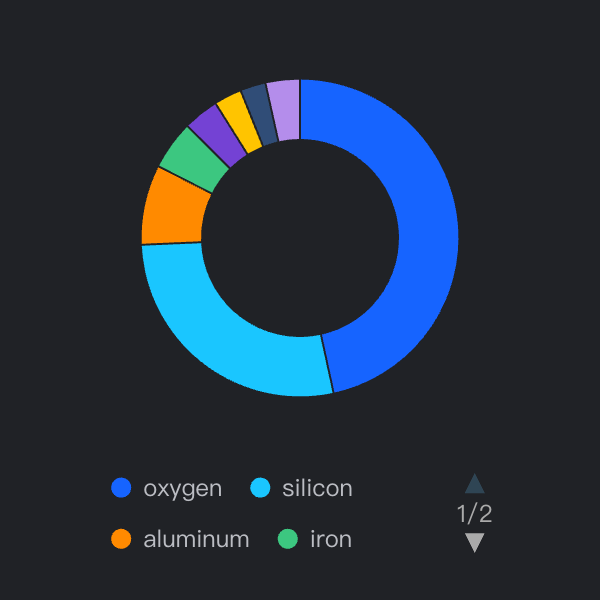
我使用了暗色主题,希望把翻页器样式调整的更显眼一些,该如何配置?
解决方案
图例翻页器对应的配置为 pager。
- 图例文字颜色可以通过
pager.textStyle.fill进行配置。 - 翻页器按钮颜色可以通过
pager.handler.style.fill进行配置。 - 翻页按钮不可用状态下的样式,需要通过
pager.handler.state.disable.fill进行配置。
例如:
  legends: {
    visible: true,
    pager:{
      textStyle:{
        fill:"rgb(170,170,170)"
      },
      handler:{
        style:{
          fill:'rgb(170,170,170)'
        },
        state:{
          disable:{
            fill:'rgb(47,69,84)'
          }
        }
      }
    }
  },</br>
代码示例
const spec = {
  type: 'pie',
  theme:"dark",
  width: 300,
  height: 300,
  data: [
    {
      id: 'id0',
      values: [
        { type: 'oxygen', value: '46.60' },
        { type: 'silicon', value: '27.72' },
        { type: 'aluminum', value: '8.13' },
        { type: 'iron', value: '5' },
        { type: 'calcium', value: '3.63' },
        { type: 'sodium', value: '2.83' },
        { type: 'potassium', value: '2.59' },
        { type: 'others', value: '3.5' }
      ]
    }
  ],
  outerRadius: 0.8,
  innerRadius: 0.5,
  padAngle: 0.6,
  valueField: 'value',
  categoryField: 'type',
  legends: {
    visible: true,
    pager:{
      textStyle:{
        fill:"rgb(170,170,170)"
      },
      handler:{
        style:{
          fill:'rgb(170,170,170)'
        },
        state:{
          disable:{
            fill:'rgb(47,69,84)'
          }
        }
      }
    }
  },
}

const vchart = new VChart((spec), { dom: CONTAINER_ID });
vchart.renderSync();

vchart.getCanvas().style.outline = '1px solid orange';
</br>
结果展示